field guide · free & open source
Angry IP Scanner, start to CSV
The whole workflow in one page: range, sweep, fetchers, reading the table, exporting what you found.
reviewed 15 september 2026 · v3.9.x
01What it actually does
Angry IP Scanner walks an address range you give it and, for every address, asks a series of small questions: do you answer ping, do you have a DNS name, what MAC are you, is anything listening on the ports I care about. Answers land in one table, one row per address. There is no database, no agent, no service running afterwards — close it and it is gone.
02The workflow
-
Get the range right
The IP button fills in your own address and subnet; the netmask list turns that into a /24 in one click. Scanning 192.168.x.0–255 covers an ordinary home LAN completely — scanning 10.0.0.0/8 does not, and will take hours to tell you so.
-
Load the fetchers you need
Under Tools → Fetchers, add MAC Address, MAC Vendor and Ports to the defaults. Each one is a column in the final table; skip the ones you will never read and the sweep finishes faster.
-
Start, and wait about a minute
The status bar counts through the range. When it stops, the numbers to read are alive hosts and open ports found — everything else in the window is decoration.
-
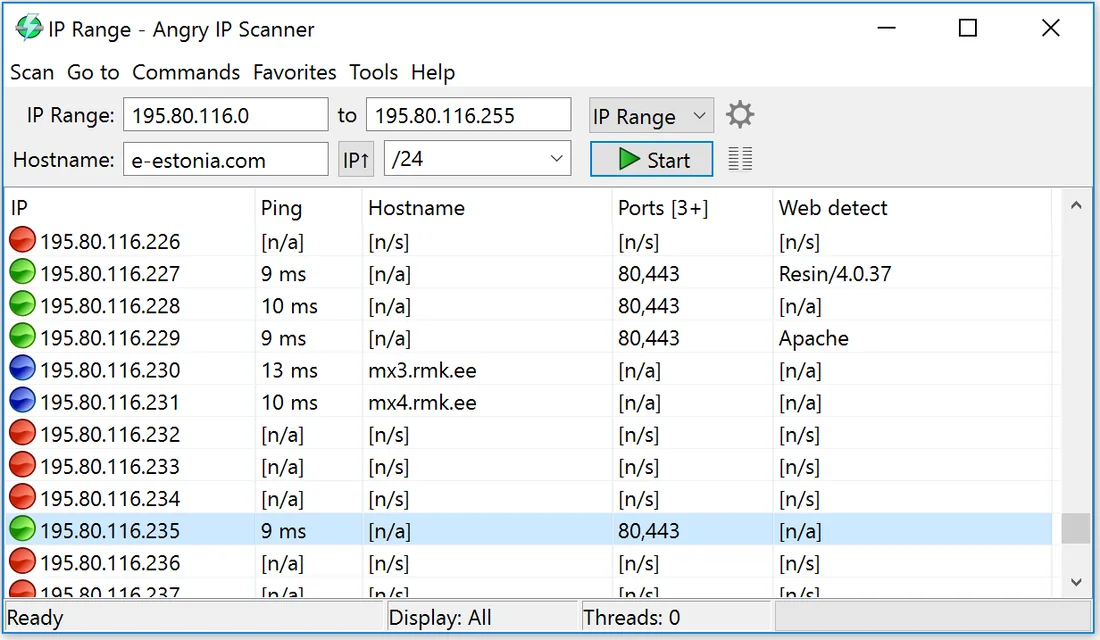
Read the table like a pro
Rows with values are live hosts.
[n/a]means the fetcher ran and the host had nothing to say;[n/s]means the host never answered the ping, so nothing was tried. That one-character difference tells you whether a firewall is hiding a device. -
Export and keep it
Scan → Export all writes CSV, TXT, XML or an IP-port list. Save one per month in the same folder and you have a poor man's inventory history — diff them and new devices stand out immediately.
03Platform notes
Windows: the installer bundles a Java runtime; nothing extra to
install. macOS: the .dmg is not notarised, so right-click →
Open on first launch. Linux: packages exist for the usual
distributions, or run the plain .jar with Java 11+.
04Asked around
Why does my antivirus complain about Angry IP Scanner?
Signature engines flag anything that sweeps addresses as potential recon tooling, so false positives on scanners are routine. Take the build from angryip.org or the project's GitHub releases and verify the published checksum instead of hunting for a "clean" mirror.
Can it show MAC addresses?
On your own subnet, yes — it reads them from the local ARP table. Across a router the column stays empty, because MAC addresses do not cross routers. Not a bug; a property of the protocol.
What do the row colours mean?
Answered hosts, dead addresses and open ports each get their own colour, and the legend under Help spells out every variant the table can produce. Customisable if the defaults clash with your eyesight.